
Virtual dyno
Build power and torque curves from real vehicle data. Use road slope, air temperature, altitude and Density Altitude to make runs more comparable.
See real graphs ↗Measure horsepower and torque on the road, time your 0–100 and 100–200 runs, record vehicle data and get AI-powered diagnostics — all from one mobile app.
One phone, one compatible OBD-II adapter and a clearer picture of your vehicle.
Build power and torque curves from real vehicle data. Use road slope, air temperature, altitude and Density Altitude to make runs more comparable.
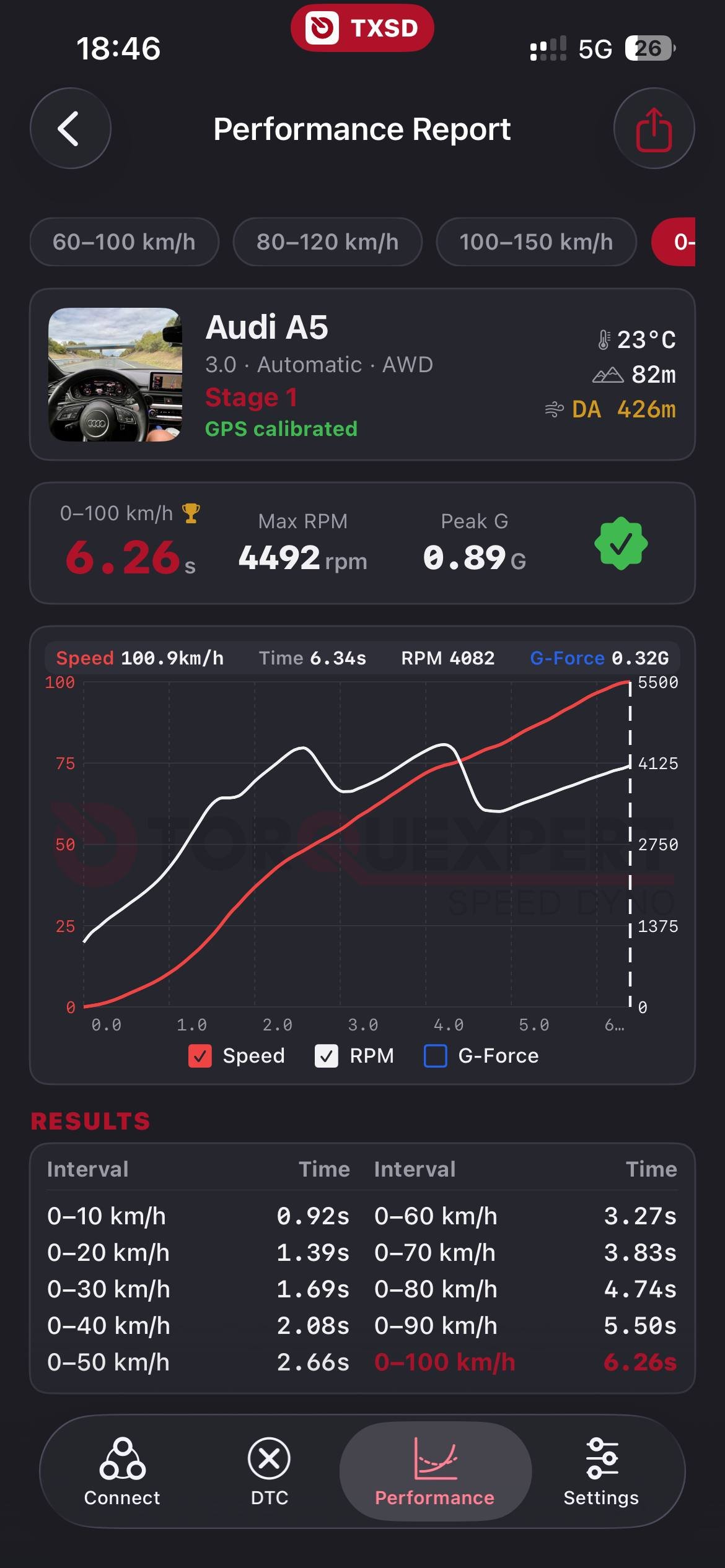
See real graphs ↗Measure 0–100, 100–200 and other intervals with ECU speed data combined with GPS.
Turn DTC codes into plain-language explanations, possible causes and practical next steps.
Watch RPM, speed, load, temperatures, acceleration, G-forces and other available values in real time.
Read available VIN, calibration and ECU data. Save logs locally and export them for analysis or sharing.
Examples from TorqueXpert SD performance runs. Select a vehicle to compare the result.
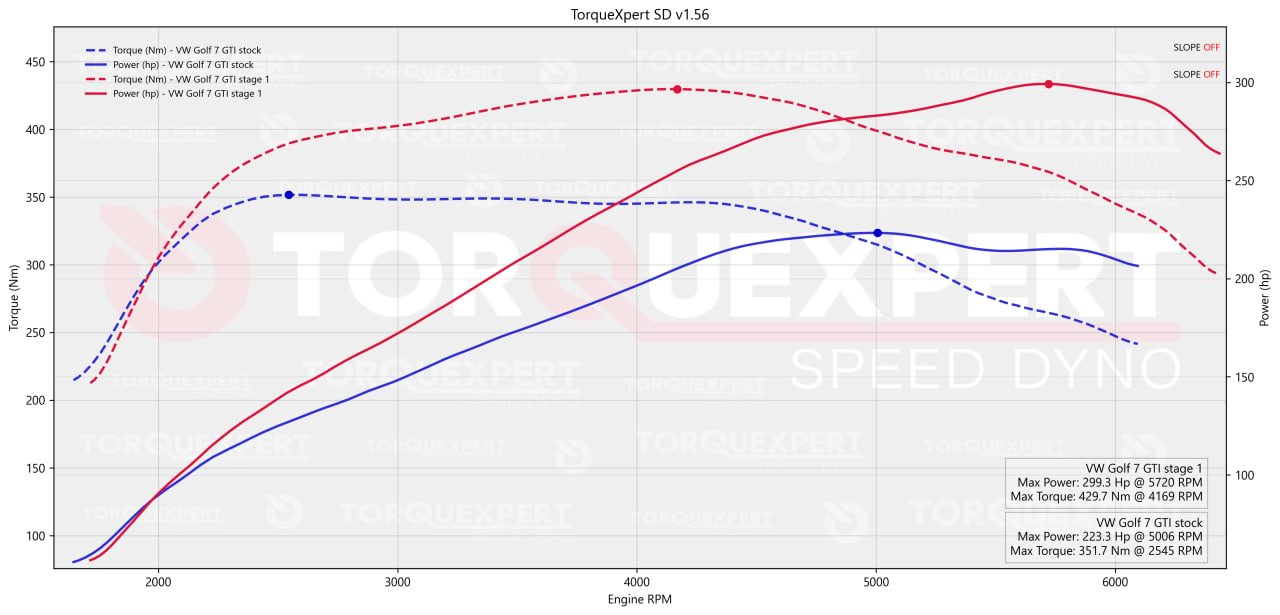
Use a flat, safe road and repeat the same gear and conditions for comparable runs. Road slope, air temperature, altitude and Density Altitude can be considered when the required data is available.
Use TorqueXpert SD to keep diagnostics, performance tests, live data and results in one mobile workflow.
With correct measurement setup and accurate vehicle data, TorqueXpert SD delivers confirmed accuracy of 93–100% compared with a real dyno bench. Unique calculation algorithms combine OBD and GPS data for a detailed power and torque estimate.
Start with five Tokens after registration and use them when you need deeper results.
Added to your balance after registration.
One Token for a calculated power and torque graph.
Two Tokens for a detailed AI diagnostic report.
One Token costs only three US dollars.
The majority of everyday app features are available for free. The app shows the Token cost before a paid analysis starts.
TorqueXpert SD uses unique algorithms to analyse several DTC codes together, identify relationships between faults and create a detailed report for the specific vehicle.
Each report can include a structured explanation of what the error means, why it may have appeared, what should be checked first and which repair paths may resolve it.

Record the parameters your vehicle exposes through OBD-II, save them locally and export CSV files for deeper analysis, tuning or technical support.
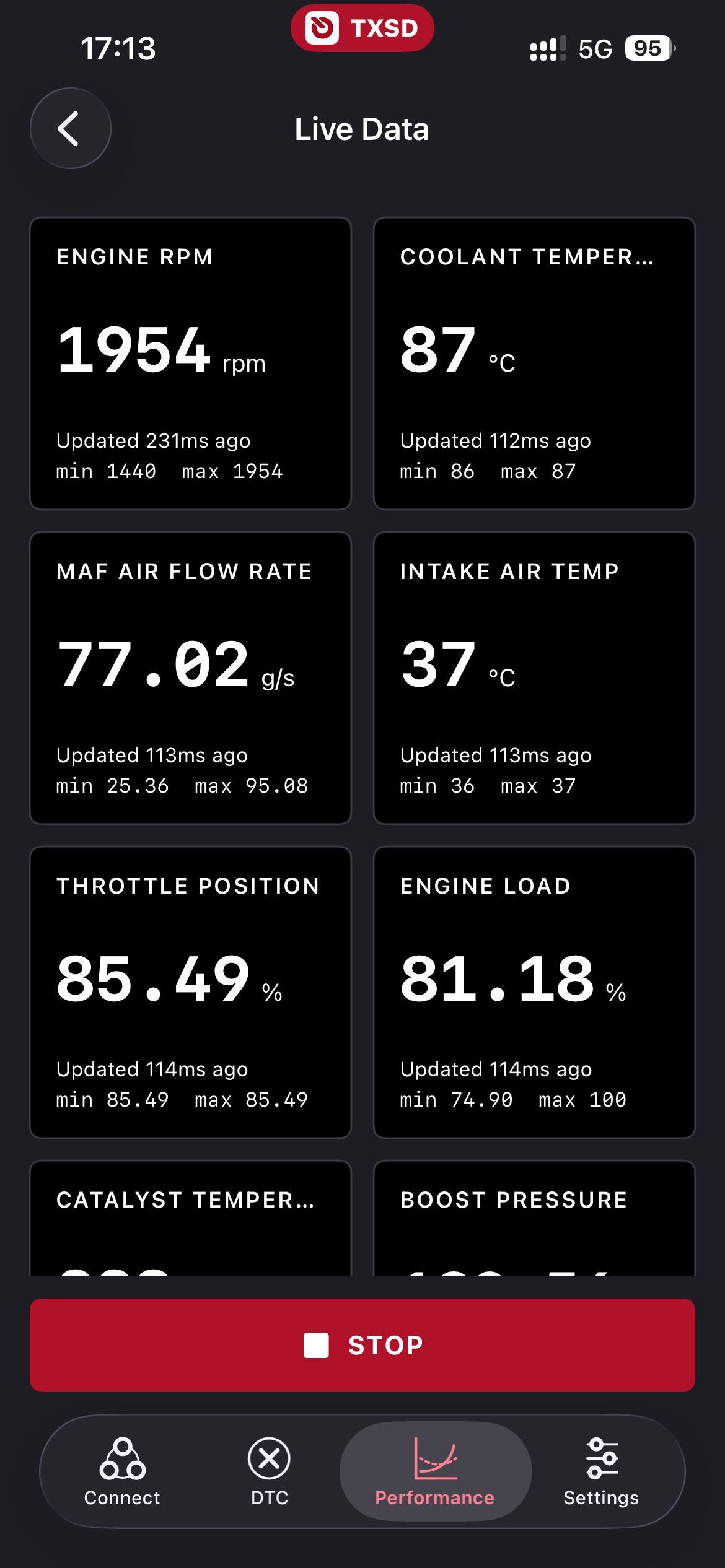
Depending on the vehicle, ECU and adapter, you can monitor live parameters and review measured power, torque, acceleration and saved logs.
Connect once, then choose the tool that fits your next run.
Connect a quality Bluetooth OBD-II adapter to your car’s diagnostic port.
Launch TorqueXpert SD, pair your phone and check the available vehicle data.
Select the workflow that matches your goal.
Bluetooth ELM327 adapters are supported. For a more stable connection and faster data, we recommend adapters built on STN chips.
Choose the version for your phone and continue to the official app page.
We recommend quality Bluetooth OBD-II adapters. Cheap clones can drop data and affect results.
Clear answers about downloading, adapters, Tokens, reports and measurements.
The Android application is available through Google Play. The iOS version is coming soon and will be announced through the TorqueXpert SD community channels.
You need an Android phone or, when available, an iPhone, a compatible Bluetooth OBD-II adapter and a supported vehicle. Insert the adapter into the vehicle's OBD-II port, enable Bluetooth, open the app and select the adapter.
We recommend Vgate vLinker MS, Vgate vLinker MC+, Vgate iCar Pro and OBDLink MX+. These adapters provide a more stable connection and better data speed than many cheap ELM327 clones.
ELM327 is a common OBD-II adapter platform. Compatibility depends on the adapter chipset, vehicle protocol, ECU and available PIDs. Some low-cost clones may connect but provide unstable Bluetooth, slow data or incomplete parameters.
With correct measurement setup and accurate vehicle data, TorqueXpert SD provides confirmed accuracy of 93–100% compared with a real dyno bench. The calculation uses OBD and GPS data, vehicle parameters and the measurement settings entered in the app.
The app can read stored, pending and permanent DTCs when supported by the vehicle. Unique analysis algorithms combine the codes, vehicle information and ECU data to provide a detailed description, possible causes, relationships between faults and repair options.
After registration, the user receives 5 free Tokens. Most everyday features are free. A power and torque graph costs 1 Token, an AI diagnostic report costs 2 Tokens and 1 Token costs $3.
Do not interact with the application while driving. Configure the measurement while stationary or let a passenger operate the device. Always choose a safe, legal road and follow local traffic rules.
Logs, measurement results and diagnostic reports are stored locally and can be exported or shared. Available fields depend on what the vehicle ECU and adapter provide.
Use email for direct questions, join the community for news and updates, or contact technical support for help with adapters, connections and measurements.